e v m
Scope && Closure
March 16, 2019
No comments
Let us talk about scope first. Scope is a mechanism in computer science to hide level of detail and localize it. What does this mean exactly ?
Think of a google maps. If we think of zoom as a scope,

This is our global scope.
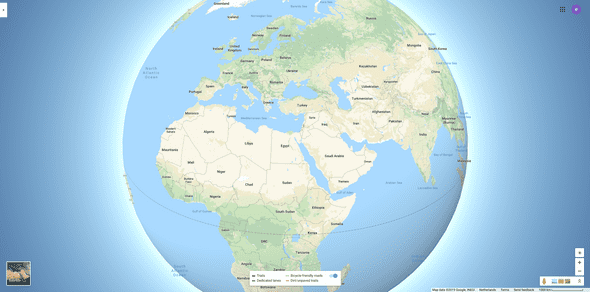
When we are running our javascript in the browser, it is running at the global scope. At the global level, only information relatvent to the globe is visible, country names, ocean names etc. The map does not try to view every street name at the global zoom level, it is irrelevant and if it did try to that it would be unusuable. Think about it, there won’t be enough space for all the text, streetnames etc.
If you search on google maps for Turkey, the result will zoom in from the global view to where you can see Turkey as whole. It does not show you other countries, just Turkey.
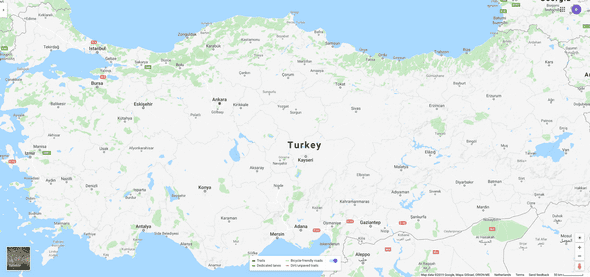
Additionally you will see that you can also see the names of the cities. Only the big ones. The map shows you the information that it thinks is relevant. It does not pollute your view, with all of the information it has.
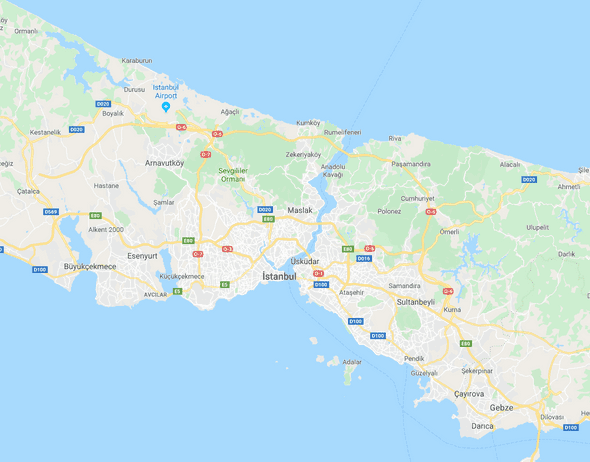
Lets zoom in to the map, for example to Istanbul. Suddenly we start to see the names of the neighbourhoods, aveneues etc. The map already has information about all these places when you first searched for Turkey, but they are not relevant. Seeing all this information would pollute the view and will make it harder for you to locate what you are searching for.
The zoom (scope) of the map also provides us with a context. If we are searching for a streetname in Istanbul, Turkey, we do not want to search the rest of the globe. This prevents us to find the streets that have the same name in different cities in Turkey.
1// Global scope here2const oceans = ['Pacific', 'Atlantic', 'Indian', 'Southern', 'Arctic'];3var name = 'Global';4function imf() {5var name = 'International Monetary Fund';6return name;7}89function Turkey() {10// local scope of Turkey11var name = 'Turkiye';12var nationalFootballTeam = 'Milli Futbol Takimi';13function Istanbul() {14// local scope of City15var name = 'Istanbul';16return name;17}18Istanbul();19return name;20}2122function Netherlands() {23var name = 'Nederland';24var nationalFootballTeam = 'Nationaal Voetbalteam';25function Amsterdam() {26var name = 'Amsterdam';27return name;28}29Amsterdam();30return name;31}32imf();33Turkey();34Netherlands();35console.log(name);
This will return
1'International Monetary Fund';2'Istanbul';3'Turkiye';4'Nederland';5'Amsterdam';6'Global';
In the above example, we are seeing name variables everywhere. When I first started coding, this was extremely confusing for me.
What you need to know
When you invoke a function (remember! if you do not call the function, it is just definition for the javascript engine), the variables inside the {} and the arguments provided to the function(...arguments) live within the function. This is the function scope, and when javascript is looking for a variable inside the function call, it will first look at this scope and only after it fails to find the variable will go one scope up, and repeat till it finds the varible/function.
The scope when looking for variables/functions always zooms out and looks to the enclosing scope, till it goes all the way to the global scope. It never zooms in. Let us imagine, you are at a city zoom level and you are searching for a specific name. By this method you only check the city scope, then the country scope and then the global scope.
On the other hand, if you would zoom in, you would have to check each city scope, inside each city, each street scope as well. That is a lot of work and it does not make the work predictable. Basically, each search becomes searching the whole code base. As programmers we want to be lazy and smart, not hard working.
More details for beginners
Let us see where the arguments fit the scope. You can skip this part if you already know that they are inside the function rather than the scope the function is defined in.
1var firstName = 'Emil'; // variable declaration2var lastName = 'Martinov'; // variable declaration3function myFullName(firstName, lastName) {4// function declaration and the parameters, firstName and lastName5return firstName + lastName; // returning the arguments !!6}7console.log(myFullName(firstName, lastName)); //logging the return of myFullName
When I first saw code like this the first time, it was very confusing for me, seeing firstName here, firstName there and the last line. I did not understand seperation of all these same named values.
From mathematics background I could guess that function is a placeholder for instructions, that values firstName, lastName are placeholders for what we might put into that function so that the function follows the recipe inside.
Let’s take a look at what happens at that code snippet.
1var firstName = 'Emil'; // variable declaration2var lastName = 'Martinov'; // variable declaration
- We define our variables firstName and lastName.
1function myFullName(firstName, lastName) {2// function declaration and the parameters, firstName and lastName3return firstName + lastName; // returning the arguments !!4}
Then we declare our function
myFullName. Inside the paranthesis(), we are creating placeholdersfirstNameandlastName, these placeholders only exist inside our function. Think of the function declaration as a cooking recipe, and the placeholders, parameters in programming language, are our ingredients. After we tell the function its instructionreturn firstName + lastName, we are done with our recipe so we close}the curly bracket.Now we just finished writing the recipe, but we have not done anything with it. So at this time it is just a piece of paper with some instructions.
1myFullName('Emil', 'Martinov'); // here we use the function2// it will return 'EmilMartinov'
- We are calling the function. The name of the function followed with
()is telling javascript engine that we want to call the function and let the recipe do some work. The'Emil'and'Martinov'are the ingredients that we use with the recipe. Since we are using our recipe function now, these are called arguments. Remember in the recipe itself they are called parameters. This small distinction is made so when we speak about functions we can communicate exactly what we are talking about to our colleagues.
When we are talking about parameters we are talking about the moment we are defining our function recipe. Those are placeholders. When we are talking about arguments, we are talking about calling the function. The arguments are the values that replace the parameters.

Written by Emil Martinov who lives Rotterdam || Istanbul and loves everything js. He tweets mostly about js.